What is Docker?
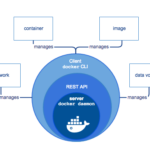
Docker is a tool designed to make it easier to create, deploy, and run applications by using containers.
Containers allow a developer to package up an application with all of the parts it needs, such as libraries and other dependencies, and ship it all out as one package with the full os included so everything configured works right out the box.
Getting Started with installing Docker
Windows / Mac OSX / Linux
WINDOWS AND MAC USERS INSTALL DOCKER:
Download & install on Windows or Mac
FOR LINUX USERS:
INSTALL DOCKER ON UBUNTU / DEBIAN / CENTOS
curl -fsSL https://get.docker.com/ | shIf you receive an error about gpg keys
EXAMPLE:
GPG error: https://download.docker.com/linux/ubuntu focal InRelease: The following signatures couldn't be verified because the public key is not available: NO_PUBKEY xxxxxxxxxxxx

RUN
chmod a+r /usr/share/keyrings/docker-archive-keyring.gpgThen Retry to install Docker.
NOTE: For windows users Hyper-V will be enabled via the software install.
Virtualization must be enabled via BIOS for Docker Desktop to work.
Check if docker is running & its version
ON WINDOWS Open Windows Powershell
LINUX or MAC OSX – Use your preferred Command Line / Terminal tool on Linux or Mac OSX.
Check if dockers daemon is running
dockerCheck your docker version
docker -v